> ## Documentation Index
> Fetch the complete documentation index at: https://storekit.com/docs/llms.txt
> Use this file to discover all available pages before exploring further.
# Find and Review Company Customers
> Use storekit's Companies view to review business customers, compare order history and spend, and see regular bookers and usual items before your next follow-up.
Find businesses that already order from you and understand what brings them back. Company customers group people using the same work email domain; they are not limited to catering orders.
The **Companies** tab is available on accounts with catering enabled. If it is missing, [contact support](/docs/getting-started/contact-support).
## Review Your Company Customers
Go to **Customers** → **Companies**.
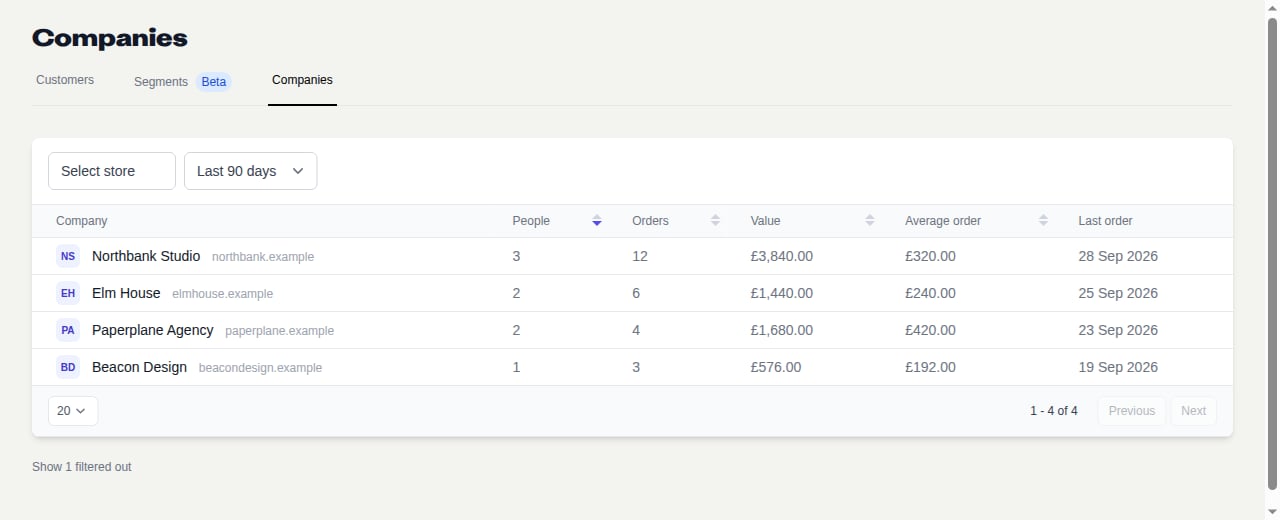
Use the store selector to choose a store, or leave it empty for all your stores. The default period is **Last 90 days**. The fixed choices are **Last 30 days**, **Last 90 days**, **Last 180 days** and **Last 365 days**.
Review **People**, **Orders**, **Value**, **Average order** and **Last order**. Sort the numeric columns to find regular customers or businesses with several bookers. Check the actual order history before treating several individual lunches as one office-catering relationship.
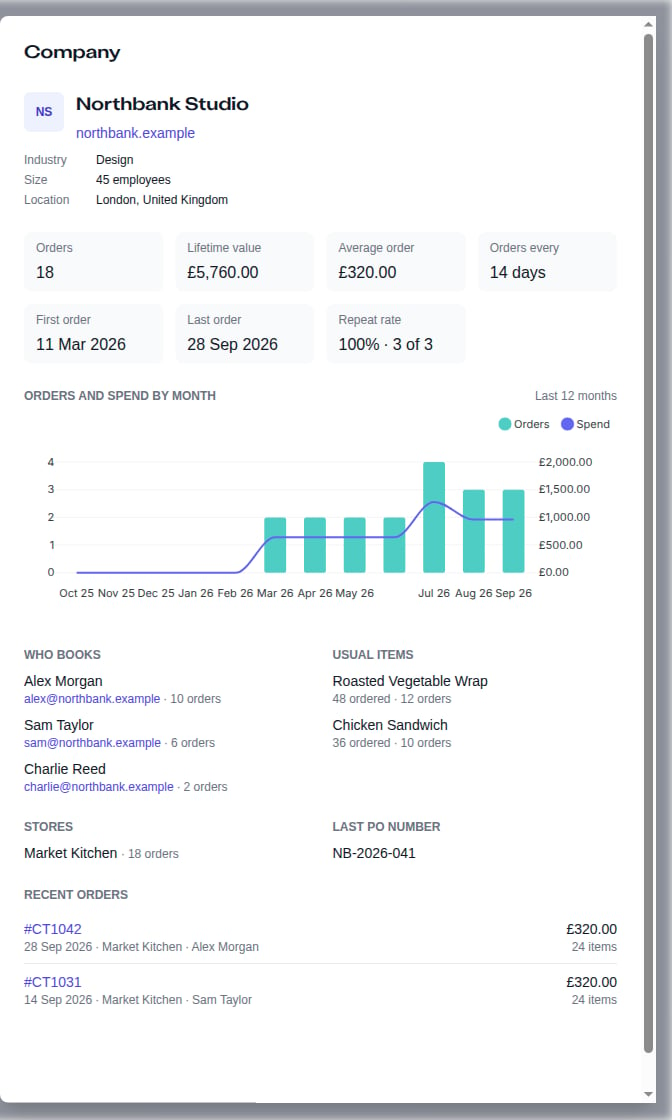
Click the company row. The side panel shows its history, **Who books**, **Usual items**, **Stores** and **Recent orders**, where available. Click an order code to see the order itself.
 The side panel's history is not restricted to the list's selected store or period. Its lifetime figures cover the stores you can access; the monthly trend and repeat rate use the last 12 months. See [Company Fields and Metrics](/docs/catering/reference/companies) before comparing totals.
## Prepare a Relevant Follow-Up
Check who usually books, which items they choose and when they last ordered. Use that context to suggest a useful next booking, rather than sending the same offer to every office.
The side panel's history is not restricted to the list's selected store or period. Its lifetime figures cover the stores you can access; the monthly trend and repeat rate use the last 12 months. See [Company Fields and Metrics](/docs/catering/reference/companies) before comparing totals.
## Prepare a Relevant Follow-Up
Check who usually books, which items they choose and when they last ordered. Use that context to suggest a useful next booking, rather than sending the same offer to every office.
 Company recognition is not marketing consent. Check the customer's preferences and your applicable marketing rules before sending a promotional message. There is no company-campaign send button on this page.
## If a Company Is Missing
Try a wider period or remove the store filter. When domains have been excluded, the link below the table shows how many were filtered out; expand it to see the reasons. A customer using a personal email address may not be linked to their employer.
* [How Company Matching Works](/docs/catering/marketing/company-matching)
* [Company Fields and Metrics](/docs/catering/reference/companies)
* [Win Repeat Catering Orders](/docs/catering/marketing/repeat-orders)
## Related topics
- [Company Fields and Metrics](/docs/catering/reference/companies.md)
- [How Company Matching Works](/docs/catering/marketing/company-matching.md)
- [Customer Data](/docs/guides/marketing/customer-data.md)
- [Catering](/docs/catering/overview.md)
- [Customer feedback, star ratings, and smart reviews](/docs/guides/marketing/customer-feedback.md)
This documentation is built and hosted on [Mintlify](https://mintlify.com), a developer documentation platform.
Company recognition is not marketing consent. Check the customer's preferences and your applicable marketing rules before sending a promotional message. There is no company-campaign send button on this page.
## If a Company Is Missing
Try a wider period or remove the store filter. When domains have been excluded, the link below the table shows how many were filtered out; expand it to see the reasons. A customer using a personal email address may not be linked to their employer.
* [How Company Matching Works](/docs/catering/marketing/company-matching)
* [Company Fields and Metrics](/docs/catering/reference/companies)
* [Win Repeat Catering Orders](/docs/catering/marketing/repeat-orders)
## Related topics
- [Company Fields and Metrics](/docs/catering/reference/companies.md)
- [How Company Matching Works](/docs/catering/marketing/company-matching.md)
- [Customer Data](/docs/guides/marketing/customer-data.md)
- [Catering](/docs/catering/overview.md)
- [Customer feedback, star ratings, and smart reviews](/docs/guides/marketing/customer-feedback.md)
This documentation is built and hosted on [Mintlify](https://mintlify.com), a developer documentation platform.