> ## Documentation Index
> Fetch the complete documentation index at: https://storekit.com/docs/llms.txt
> Use this file to discover all available pages before exploring further.
# Print a Catering Run Sheet
> Print a storekit catering run sheet for dispatch, with the day's delivery and pickup times, destinations, purchase order numbers and scheduling warnings in one place.
Give the person coordinating deliveries and collections a time-ordered overview of the day. Use pack lists alongside it to check the contents of each order.
## Print the Day's Timeline
Go to **Orders** → **Catering**. Choose the stores in the selector, then find the date you are preparing for.
Click **Run sheet** beside that date. It opens a printable page for that day and the selected stores.
Check the conflict summary above the table and the **Flags** column. Resolve missing courier bookings and check the timing of pickups before handing the sheet to dispatch.
[See the flag definitions →](/docs/catering/reference/operations#run-sheet)
Click **Print** to open your browser's print dialogue. Choose your printer, or save a PDF if your browser offers that option. Use **Back to catering** to return to the lookahead.
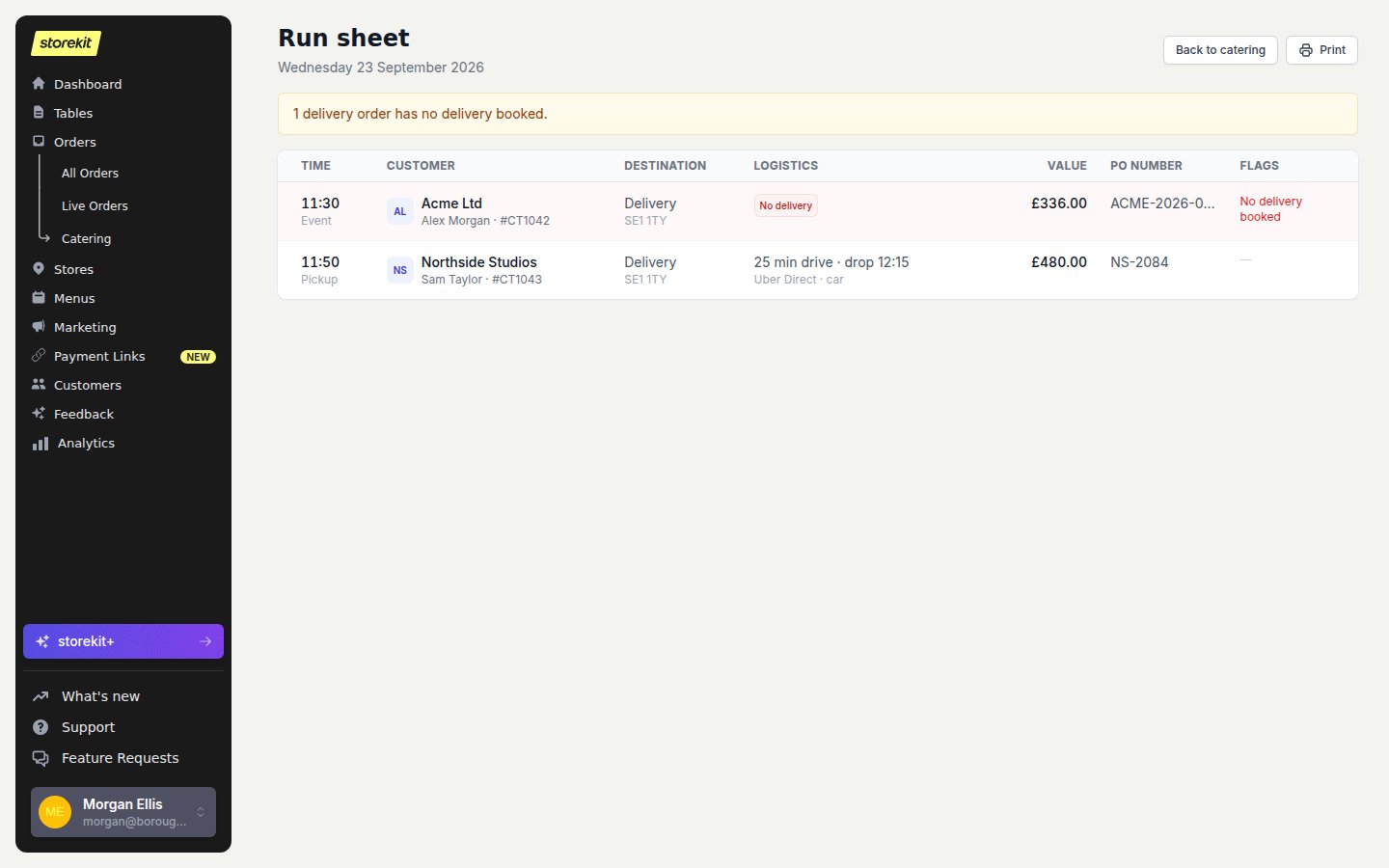 Print close to dispatch and check the live order if a booking changes. A printed sheet does not update when an order or courier time changes.
## Next
* [Print Pack Lists](/docs/catering/operations/pack-lists) for the packing team.
* [Print a Prep Sheet](/docs/guides/reports/pre-orders-report) for kitchen totals.
## Related topics
- [Catering](/docs/catering/overview.md)
- [Catering Views and Printouts](/docs/catering/reference/operations.md)
- [Printing a Prep Sheet for Pre-Orders](/docs/guides/reports/pre-orders-report.md)
- [Print Catering Pack Lists](/docs/catering/operations/pack-lists.md)
- [Plan Upcoming Catering Orders](/docs/catering/operations/planning-orders.md)
This documentation is built and hosted on [Mintlify](https://mintlify.com), a developer documentation platform.
Print close to dispatch and check the live order if a booking changes. A printed sheet does not update when an order or courier time changes.
## Next
* [Print Pack Lists](/docs/catering/operations/pack-lists) for the packing team.
* [Print a Prep Sheet](/docs/guides/reports/pre-orders-report) for kitchen totals.
## Related topics
- [Catering](/docs/catering/overview.md)
- [Catering Views and Printouts](/docs/catering/reference/operations.md)
- [Printing a Prep Sheet for Pre-Orders](/docs/guides/reports/pre-orders-report.md)
- [Print Catering Pack Lists](/docs/catering/operations/pack-lists.md)
- [Plan Upcoming Catering Orders](/docs/catering/operations/planning-orders.md)
This documentation is built and hosted on [Mintlify](https://mintlify.com), a developer documentation platform.