> ## Documentation Index
> Fetch the complete documentation index at: https://storekit.com/docs/llms.txt
> Use this file to discover all available pages before exploring further.
# Comtrex (Zonal)
> Connect Zonal's Comtrex EPOS to storekit to inject orders onto the till, pull prices from the till catalogue, and take pay-at-table payments.
Comtrex is Zonal's EPOS platform. storekit talks directly to the Comtrex server on your site: it posts online orders onto the till as guest checks, reads the till's item catalogue so you can match your storekit menu to it, pulls prices (and optionally tax rates) from the till, and — for dine-in venues — reads open checks so guests can pay their bill from their phone.
Unlike Lightspeed or Toast, Comtrex does not import a menu into storekit. You build the menu in storekit and link each product, modifier and table to the till with a **POS ID**.
This section is split into focused guides. Start with **Connecting Comtrex**, then set up the areas you need.
Enter the server address and vendor ID, load media types from the till, and turn the integration on
Browse the till catalogue, set POS IDs, and pull prices from the till
What storekit sends to the till, sales types, scheduled orders, notes, cover counts and retries
Give each storekit table the till's table number so orders land on the right check
Let guests see and pay their open Comtrex check from their phone
Fix connection, linking, order and pay-at-table problems
## How the Connection Works
storekit connects to the Comtrex Real Time Ordering interface on your site's Comtrex server. You enter the server's address in **Server IP Address** and the vendor name Zonal has set up for storekit in **Vendor ID**; storekit then posts every request to `http:///v10/jrequest.cgi` on that server. There is no OAuth step and no Zonal cloud account to authorise — the Comtrex server just has to be reachable from storekit.
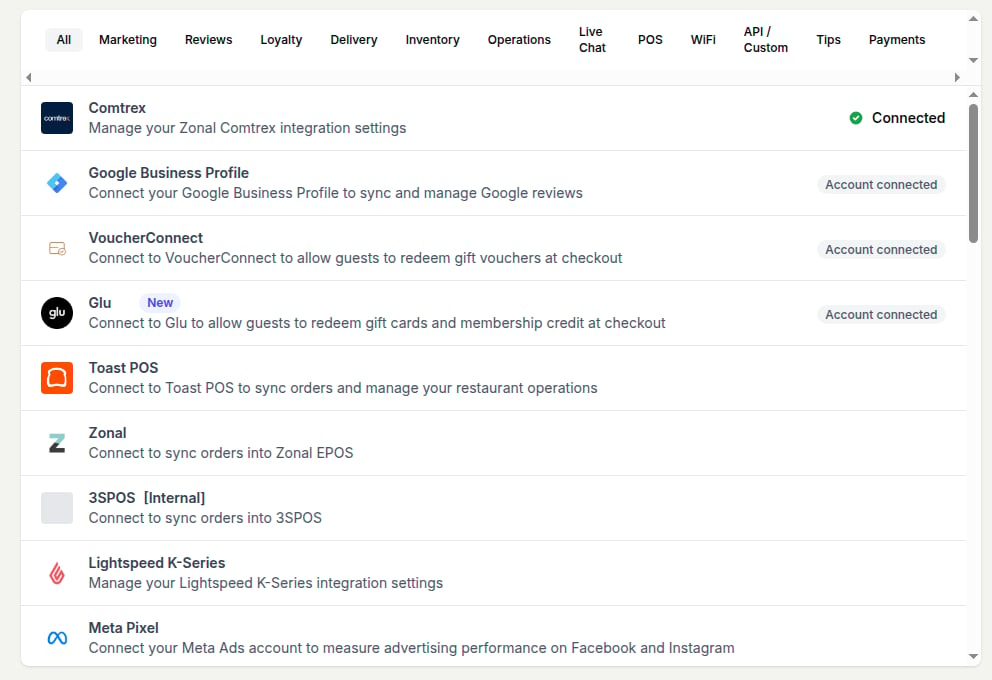 One storekit store connects to one Comtrex server. For multi-site setups, connect each store separately.
The Comtrex integration is only available to accounts that have it enabled. If you don't see **Comtrex** in your **Integrations** list, [contact storekit support](/docs/getting-started/contact-support) to have it turned on.
## How Orders Flow to Comtrex
```
Customer places order on storekit
↓
storekit queues the order for dispatch
↓
storekit builds a CreateNewOrder request (items and modifiers by POS ID, table number,
sales type, discounts, tip, note, payment)
↓
Comtrex accepts → order marked Accepted, guest check number stored as the POS receipt
↓
Comtrex rejects or can't be reached → storekit retries, then marks the order failed
and emails the store
```
Orders are dispatched as soon as they're placed — you don't have to accept them first. If a guest has opened their table's bill in storekit and orders more, the items are added to that check instead of opening a new one.
## Supported Features
| Feature | Supported |
| ----------------------------------------------------- | :-------: |
| Import the menu from the till | ✗ |
| Manual linking by **POS ID** | ✓ |
| Browse the till catalogue in the dashboard | ✓ |
| Price sync from the till (existing linked items only) | ✓ |
| Tax rate sync from the till | ✓ |
| Scheduled price sync | ✗ |
| Product images, allergens, descriptions from the till | ✗ |
| Feature | Supported |
| ------------------------------------------------ | :------------------: |
| Order injection | ✓ |
| Scheduled orders (sent as Comtrex future orders) | ✓ |
| Order buffering | Support-managed only |
| Automatic retries on failure | ✓ |
| Discounts (posted to a till media type) | ✓ |
| Tips | ✓ |
| Service charge | ✓ |
| Custom order notes template | ✓ |
| Cover count | ✓ |
| Delivery details | ✓ |
| Cancel a scheduled order on the till | ✓ |
| Basket validation before checkout | ✗ |
| Auto-snooze items after a failure | ✗ |
| Feature | Supported |
| ------------------------------------------------ | :-------: |
| Live bill sync | ✓ |
| Apply payments to the check | ✓ |
| Partial and split payments | ✓ |
| Payments taken on the till reduce the amount due | ✓ |
| Add to existing check | ✓ |
| Refund till payments from storekit | ✗ |
| Feature | Supported |
| -------------------------------------- | :-------: |
| Floor plan sync | ✗ |
| Real-time stock updates | ✗ |
| Order readiness sync (auto open/close) | ✗ |
| Separate till connection per store | ✓ |
## Related Guides
Compare Comtrex with storekit's other POS integrations
How order injection works across POS providers
How storekit matches products to POS identifiers
How pay-at-table works for guests and staff
## Related topics
- [Connecting Comtrex](/docs/guides/integrations/pos/comtrex/connect.md)
- [Menu Linking & Price Sync](/docs/guides/integrations/pos/comtrex/menu-sync.md)
- [Troubleshooting](/docs/guides/integrations/pos/comtrex/troubleshooting.md)
- [Dine-in: Tables](/docs/guides/integrations/pos/comtrex/dine-in.md)
- [PLU Mapping Guide](/docs/guides/integrations/pos/advanced/plu-mapping.md)
One storekit store connects to one Comtrex server. For multi-site setups, connect each store separately.
The Comtrex integration is only available to accounts that have it enabled. If you don't see **Comtrex** in your **Integrations** list, [contact storekit support](/docs/getting-started/contact-support) to have it turned on.
## How Orders Flow to Comtrex
```
Customer places order on storekit
↓
storekit queues the order for dispatch
↓
storekit builds a CreateNewOrder request (items and modifiers by POS ID, table number,
sales type, discounts, tip, note, payment)
↓
Comtrex accepts → order marked Accepted, guest check number stored as the POS receipt
↓
Comtrex rejects or can't be reached → storekit retries, then marks the order failed
and emails the store
```
Orders are dispatched as soon as they're placed — you don't have to accept them first. If a guest has opened their table's bill in storekit and orders more, the items are added to that check instead of opening a new one.
## Supported Features
| Feature | Supported |
| ----------------------------------------------------- | :-------: |
| Import the menu from the till | ✗ |
| Manual linking by **POS ID** | ✓ |
| Browse the till catalogue in the dashboard | ✓ |
| Price sync from the till (existing linked items only) | ✓ |
| Tax rate sync from the till | ✓ |
| Scheduled price sync | ✗ |
| Product images, allergens, descriptions from the till | ✗ |
| Feature | Supported |
| ------------------------------------------------ | :------------------: |
| Order injection | ✓ |
| Scheduled orders (sent as Comtrex future orders) | ✓ |
| Order buffering | Support-managed only |
| Automatic retries on failure | ✓ |
| Discounts (posted to a till media type) | ✓ |
| Tips | ✓ |
| Service charge | ✓ |
| Custom order notes template | ✓ |
| Cover count | ✓ |
| Delivery details | ✓ |
| Cancel a scheduled order on the till | ✓ |
| Basket validation before checkout | ✗ |
| Auto-snooze items after a failure | ✗ |
| Feature | Supported |
| ------------------------------------------------ | :-------: |
| Live bill sync | ✓ |
| Apply payments to the check | ✓ |
| Partial and split payments | ✓ |
| Payments taken on the till reduce the amount due | ✓ |
| Add to existing check | ✓ |
| Refund till payments from storekit | ✗ |
| Feature | Supported |
| -------------------------------------- | :-------: |
| Floor plan sync | ✗ |
| Real-time stock updates | ✗ |
| Order readiness sync (auto open/close) | ✗ |
| Separate till connection per store | ✓ |
## Related Guides
Compare Comtrex with storekit's other POS integrations
How order injection works across POS providers
How storekit matches products to POS identifiers
How pay-at-table works for guests and staff
## Related topics
- [Connecting Comtrex](/docs/guides/integrations/pos/comtrex/connect.md)
- [Menu Linking & Price Sync](/docs/guides/integrations/pos/comtrex/menu-sync.md)
- [Troubleshooting](/docs/guides/integrations/pos/comtrex/troubleshooting.md)
- [Dine-in: Tables](/docs/guides/integrations/pos/comtrex/dine-in.md)
- [PLU Mapping Guide](/docs/guides/integrations/pos/advanced/plu-mapping.md)