> ## Documentation Index
> Fetch the complete documentation index at: https://storekit.com/docs/llms.txt
> Use this file to discover all available pages before exploring further.
# Connecting Deliverect
> Connect a storekit store to Deliverect with storekit support, then review the Deliverect channel settings in your dashboard.
Deliverect connections are set up by storekit together with Deliverect. There is no self-serve connection button: Deliverect sends a channel-status callback, and storekit uses it to assign the channel link ID to your store.
## Before The Connection
Go to **Stores** → your store → **Settings** → **Integrations**. Before the connection is in place, the integration entry is **EPOS** with the description “Connect to your EPOS system to sync menus, send orders and manage your restaurant operations”.
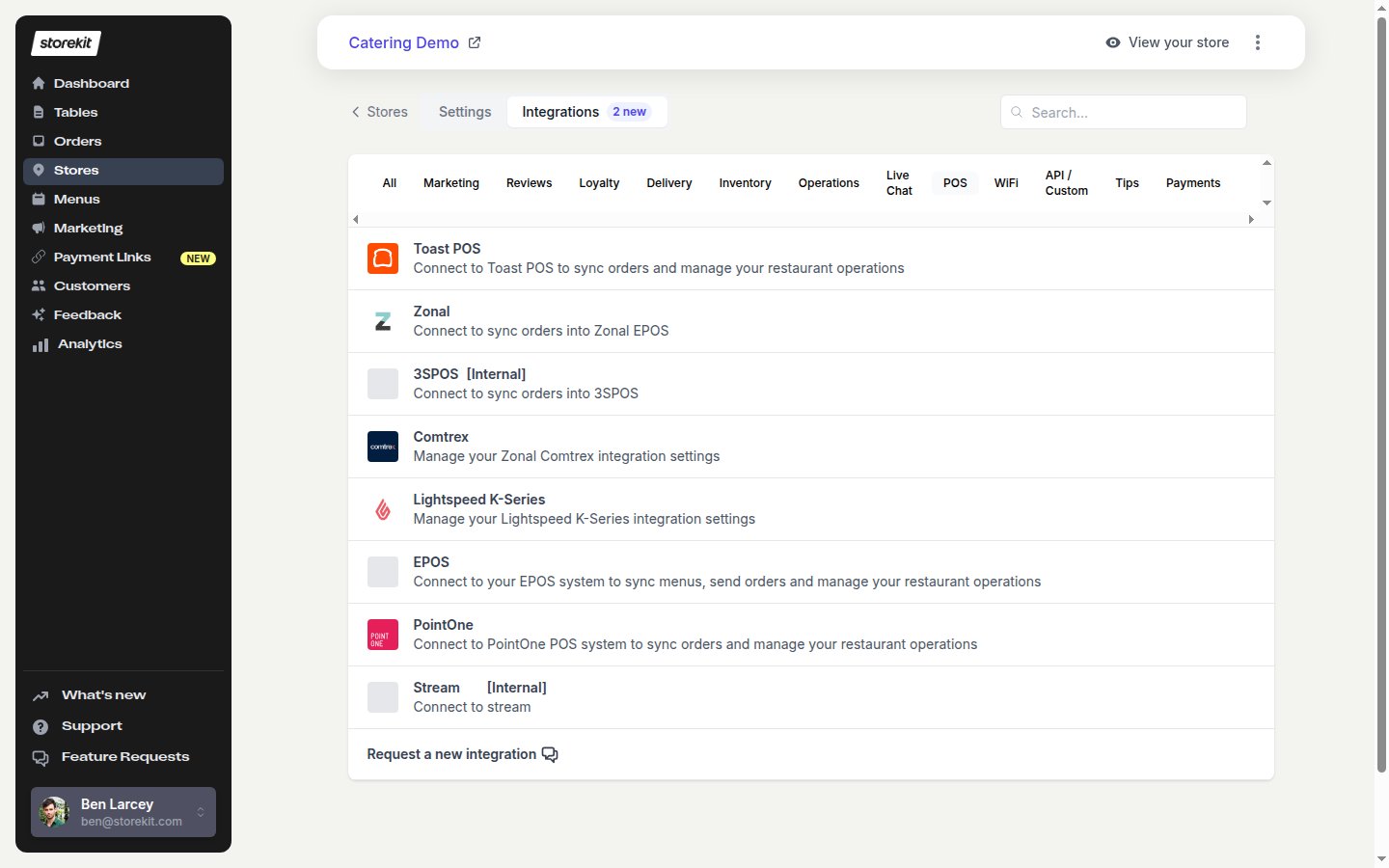 Select **EPOS** to open **EPOS Integration**. Under **Details**, the page shows **No EPOS system connected yet.** Click **Integrate your EPOS** to open live chat with storekit support.
Tell storekit support that you want to connect this store to Deliverect. storekit and Deliverect complete the setup together. You do not enter a Deliverect ID or authorise a channel from this page.
## After The Connection
When Deliverect has linked the store to a channel, Deliverect sends the channel-status callback. The callback assigns the channel link ID to the store. **Deliverect** then appears in the **Integrations** list and shows **Connected**. This entry is visible only when the store has a Deliverect ID.
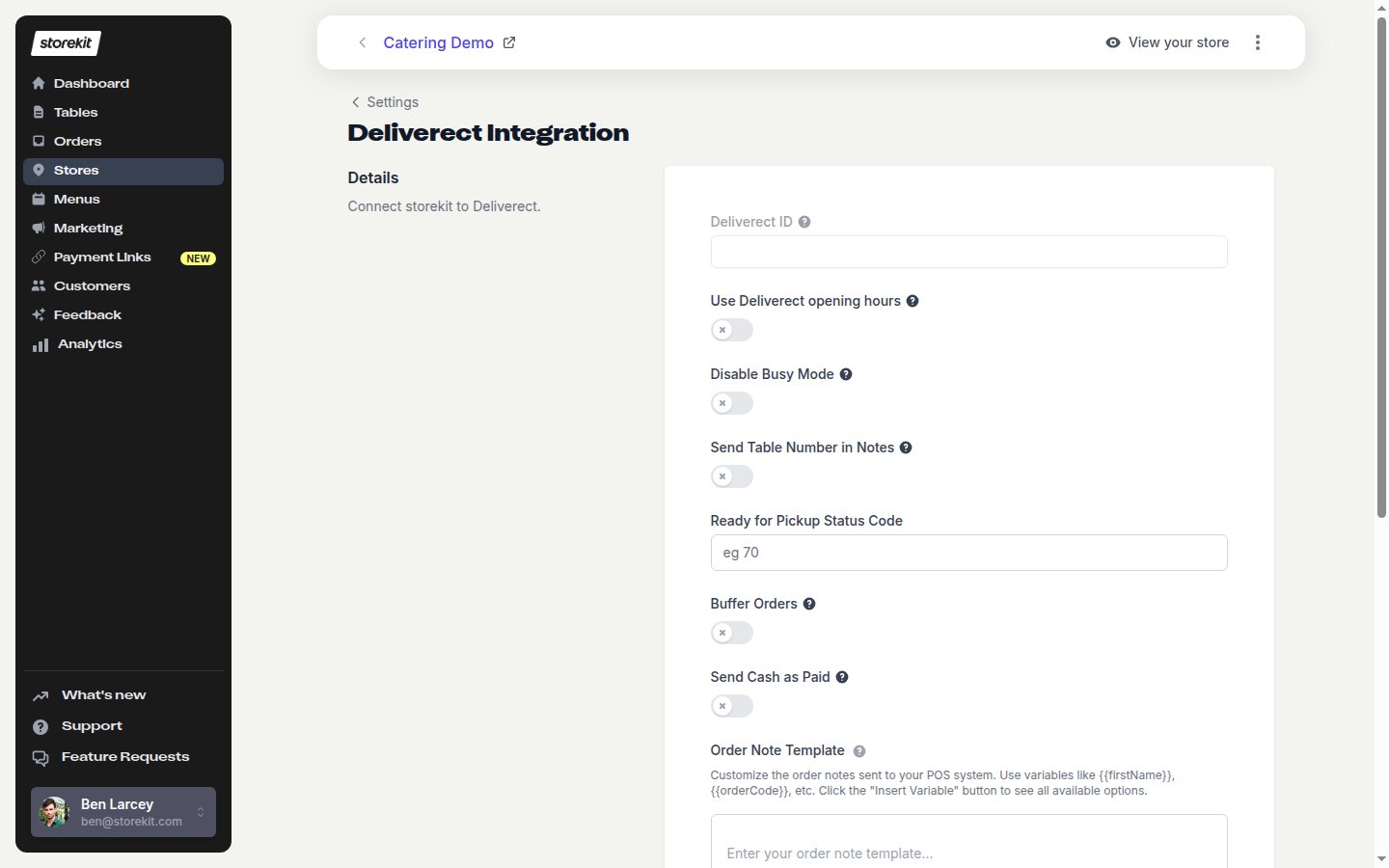
Select **Deliverect** to open **Deliverect Integration**.
Select **EPOS** to open **EPOS Integration**. Under **Details**, the page shows **No EPOS system connected yet.** Click **Integrate your EPOS** to open live chat with storekit support.
Tell storekit support that you want to connect this store to Deliverect. storekit and Deliverect complete the setup together. You do not enter a Deliverect ID or authorise a channel from this page.
## After The Connection
When Deliverect has linked the store to a channel, Deliverect sends the channel-status callback. The callback assigns the channel link ID to the store. **Deliverect** then appears in the **Integrations** list and shows **Connected**. This entry is visible only when the store has a Deliverect ID.
Select **Deliverect** to open **Deliverect Integration**.
 ## Deliverect Settings
The page contains these settings. Click **Save** after changing them.
| Setting | Behaviour |
| -------------------------------- | -------------------------------------------------------------------------------------------------------------------------------------------------------------------------------------------------------------------------------------------------------------------------------------------------------------------------------------------------------------------------------------------------------------------------------------- |
| **Deliverect ID** | Read-only. The page help text says: “The deliverect channel link ID. Contact us to remove or change this value.” |
| **Use Deliverect opening hours** | “Toggle to use the opening hours set for this venue in Deliverect.” When on, an availability-hours update from Deliverect overwrites the store's opening hours. |
| **Disable Busy Mode** | “Disable busy mode functionality in Deliverect.” When on, storekit ignores Deliverect's `PAUSED`, `ONLINE` and `BUSY` busy-mode statuses. |
| **Send Table Number in Notes** | “Include table number information in order notes sent to Deliverect.” For an in-store order, storekit appends `Table -
## Deliverect Settings
The page contains these settings. Click **Save** after changing them.
| Setting | Behaviour |
| -------------------------------- | -------------------------------------------------------------------------------------------------------------------------------------------------------------------------------------------------------------------------------------------------------------------------------------------------------------------------------------------------------------------------------------------------------------------------------------- |
| **Deliverect ID** | Read-only. The page help text says: “The deliverect channel link ID. Contact us to remove or change this value.” |
| **Use Deliverect opening hours** | “Toggle to use the opening hours set for this venue in Deliverect.” When on, an availability-hours update from Deliverect overwrites the store's opening hours. |
| **Disable Busy Mode** | “Disable busy mode functionality in Deliverect.” When on, storekit ignores Deliverect's `PAUSED`, `ONLINE` and `BUSY` busy-mode statuses. |
| **Send Table Number in Notes** | “Include table number information in order notes sent to Deliverect.” For an in-store order, storekit appends `Table - ` to the order note. |
| **Ready for Pickup Status Code** | The numeric Deliverect status code that marks an order ready for pickup. The field placeholder is `eg 70`; the customer is notified as normal. |
| **Buffer Orders** | “Orders are buffered in storekit and are only sent to Deliverect when they need to be prepared.” |
| **Buffer Delay (in minutes)** | Used with **Buffer Orders**. The field placeholder is `eg 30`. A scheduled order is sent this many minutes before its requested time. |
| **Send Cash as Paid** | “Mark cash orders as paid when sending to Deliverect.” Without it, cash orders are sent as unpaid. Card, other payment types and £0 orders are always sent as paid. |
| **Order Note Template** | A text area with the placeholder **Enter your order note template...** and a 250-character limit. Use **Insert Variable** to choose variables such as `{{firstName}}` and `{{orderCode}}`. The page says: “Customize the order notes sent to your POS system. Use variables like {{firstName}}, {{orderCode}}, etc. Click the "Insert Variable" button to see all available options.” Delivery notes are appended for delivery orders. |
| **Split Service Charge and Tip** | “When enabled, the service charge and customer tip are sent as separate fields to Deliverect. When disabled (default), the tip is added to the service charge and sent as a single combined amount.” |
| **Menu Sync Only** | “When enabled, Deliverect is used only for menu sync. Orders are dispatched to a different POS.” It also stops cancellation and courier updates being sent to Deliverect, ignores busy mode, and prevents channel-status callbacks from changing the store's POS provider or enabled state. |
**Disable Busy Mode** and **Menu Sync Only** both prevent Deliverect busy-mode statuses from changing store availability. With busy mode enabled, `PAUSED` takes the storekit store offline and `ONLINE` brings it back online; `BUSY` is also received from Deliverect but does not itself change the store's online state.
## Buffering Pre-orders
When **Buffer Orders** is on and **Buffer Delay (in minutes)** has a value, scheduled orders are held in storekit and sent to Deliverect that many minutes before the requested time. If that point has already passed, storekit sends the order immediately. ASAP orders are never buffered.
You can send a buffered order early from its order page with **Resend order to POS**. The confirmation text is: “This order is scheduled to be sent to the POS at {time}. Resending will cancel that scheduled send and send the order to the POS now.”
## Related topics
- [Deliverect](/docs/guides/integrations/pos/deliverect/overview.md)
- [Deliverect Orders](/docs/guides/integrations/pos/deliverect/orders.md)
- [Connecting Toast](/docs/guides/integrations/pos/toast/connect.md)
- [Connecting Syrve](/docs/guides/integrations/pos/syrve/connect.md)
- [Connecting Comtrex](/docs/guides/integrations/pos/comtrex/connect.md)