> ## Documentation Index
> Fetch the complete documentation index at: https://storekit.com/docs/llms.txt
> Use this file to discover all available pages before exploring further.
# Deliverect Menu Sync
> Publish menus in Deliverect and let storekit import products, prices, modifiers, availability, translations and dietary information.
Deliverect is the source of truth for a Deliverect-connected menu. Publish the menu in Deliverect; storekit receives a webhook and processes the menu update asynchronously.
 ## Publish A Menu
Publish the menu in Deliverect using Deliverect's own dashboard. There is no menu sync button in storekit for Deliverect menus. After Deliverect sends the webhook, storekit processes the published menu and updates the connected menu.
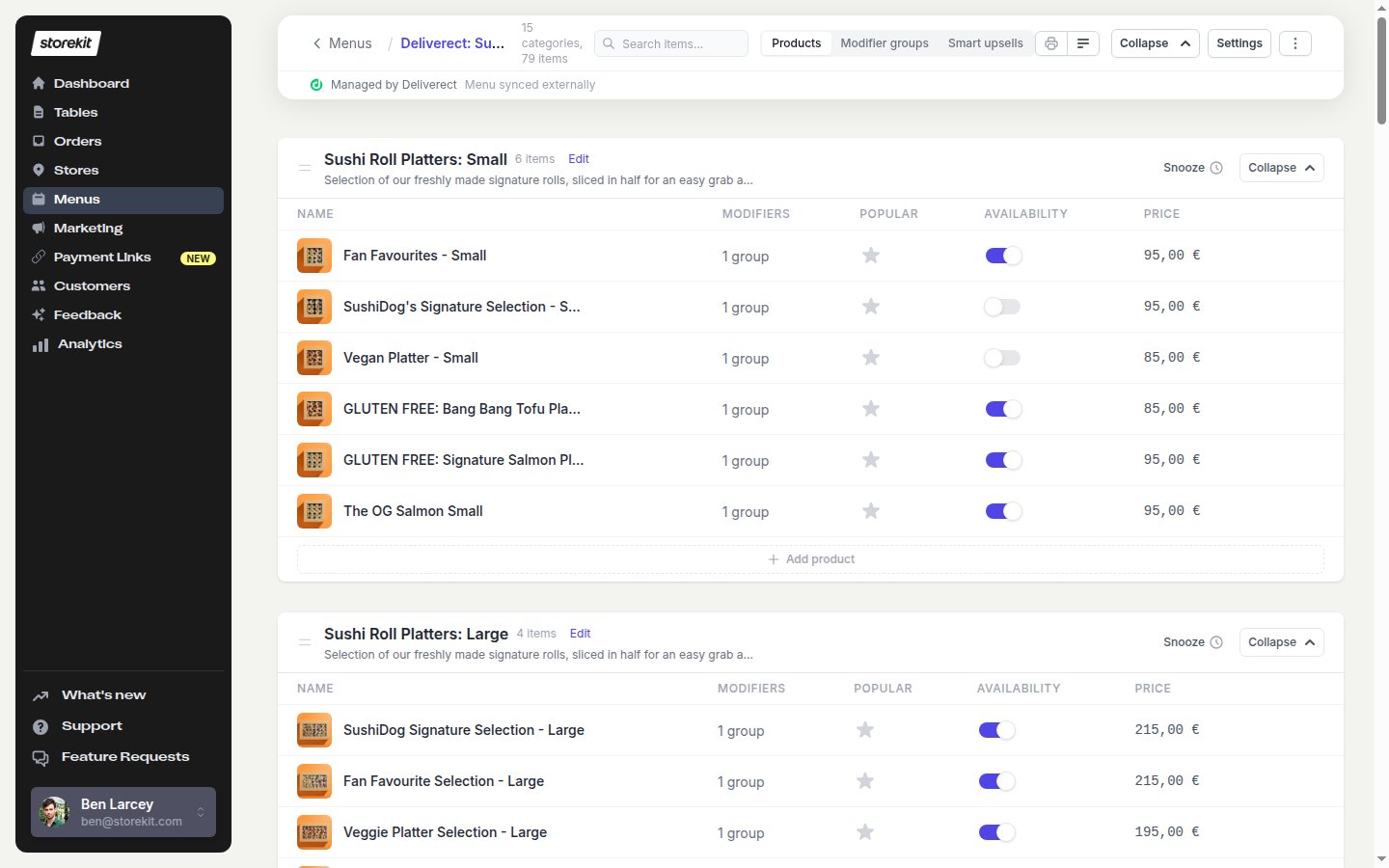
The menu editor shows a **Managed by Deliverect** badge and a **Menu synced externally** banner. The menus list also shows the Deliverect icon with the tooltip **Managed by Deliverect**.
storekit does not pull an unpublished draft from Deliverect. Only data in the newly published Deliverect menu is imported.
## What Gets Imported
storekit imports:
* categories and products
* prices and PLUs
* descriptions and images
* modifier groups and modifiers, including one level of nested modifiers
* translations
* nutrition and allergen information
* ingredients and deposits
* tax rates
* availability hours
* snoozed items
Anything absent from the newly published Deliverect menu is removed from storekit. This includes products, categories, modifiers and other menu data that was present in an earlier publication.
## Add Or Change Items
Create new categories and products in Deliverect, then publish the menu again. The storekit menu editor is read-only for the structure of a Deliverect-managed menu.
If you try to add a category or product in storekit, the dashboard shows:
> “You can't add a new category here. Please create new items in your POS”
For the general POS menu-sync workflow, see [POS Menu Sync](/docs/guides/menu/pos-menu-sync). For one-level nested modifier behaviour, see [Nested Modifiers](/docs/guides/menu/nested-modifiers).
## Related topics
- [POS Integration Overview](/docs/guides/integrations/pos/overview.md)
- [POS Menu Sync](/docs/guides/menu/pos-menu-sync.md)
- [Toast Menu Sync](/docs/guides/integrations/pos/toast/menu-sync.md)
- [Lightspeed Menu Sync](/docs/guides/integrations/pos/lightspeed/menu-sync.md)
- [Syrve Menu Sync](/docs/guides/integrations/pos/syrve/menu-sync.md)
## Publish A Menu
Publish the menu in Deliverect using Deliverect's own dashboard. There is no menu sync button in storekit for Deliverect menus. After Deliverect sends the webhook, storekit processes the published menu and updates the connected menu.
The menu editor shows a **Managed by Deliverect** badge and a **Menu synced externally** banner. The menus list also shows the Deliverect icon with the tooltip **Managed by Deliverect**.
storekit does not pull an unpublished draft from Deliverect. Only data in the newly published Deliverect menu is imported.
## What Gets Imported
storekit imports:
* categories and products
* prices and PLUs
* descriptions and images
* modifier groups and modifiers, including one level of nested modifiers
* translations
* nutrition and allergen information
* ingredients and deposits
* tax rates
* availability hours
* snoozed items
Anything absent from the newly published Deliverect menu is removed from storekit. This includes products, categories, modifiers and other menu data that was present in an earlier publication.
## Add Or Change Items
Create new categories and products in Deliverect, then publish the menu again. The storekit menu editor is read-only for the structure of a Deliverect-managed menu.
If you try to add a category or product in storekit, the dashboard shows:
> “You can't add a new category here. Please create new items in your POS”
For the general POS menu-sync workflow, see [POS Menu Sync](/docs/guides/menu/pos-menu-sync). For one-level nested modifier behaviour, see [Nested Modifiers](/docs/guides/menu/nested-modifiers).
## Related topics
- [POS Integration Overview](/docs/guides/integrations/pos/overview.md)
- [POS Menu Sync](/docs/guides/menu/pos-menu-sync.md)
- [Toast Menu Sync](/docs/guides/integrations/pos/toast/menu-sync.md)
- [Lightspeed Menu Sync](/docs/guides/integrations/pos/lightspeed/menu-sync.md)
- [Syrve Menu Sync](/docs/guides/integrations/pos/syrve/menu-sync.md)