> ## Documentation Index
> Fetch the complete documentation index at: https://storekit.com/docs/llms.txt
> Use this file to discover all available pages before exploring further.
# PointOne POS
> Connect PointOne cloud POS to storekit to import your menu, send collection, delivery and table orders to the till, and take pay-at-table payments.
PointOne is a cloud hospitality POS. Once connected, storekit imports your menu from PointOne (with allergens, nutrition, images and category hours), sends every online order into PointOne as a collection, delivery or table order, and — for dine-in venues — lets guests scan a QR code to see and pay their live PointOne bill.
This section is split into focused guides. Start with **Connecting PointOne**, then set up the areas you need.
Enter your API Key, Site ID and Organisation ID, then turn the integration on
Import your PointOne menu and understand what comes across
How orders reach PointOne, order types, notes, pre-orders and failures
Let guests pay their PointOne bill from their phone
Fix connection, menu, order and pay-at-table problems
## How the Connection Works
PointOne connects with API credentials rather than a login flow. Your PointOne account manager gives you an **API Key**, a **Site ID** and an **Organisation ID**; you enter them on **Stores** → your store → **Settings** → **Integrations** → **PointOne**, click **Save**, then switch **Integration Status** on. storekit uses those credentials to read your PointOne menu, submit orders to the site, and look up and pay table bills.
One storekit store connects to one PointOne site. For multi-site setups, connect each store to its own Site ID.
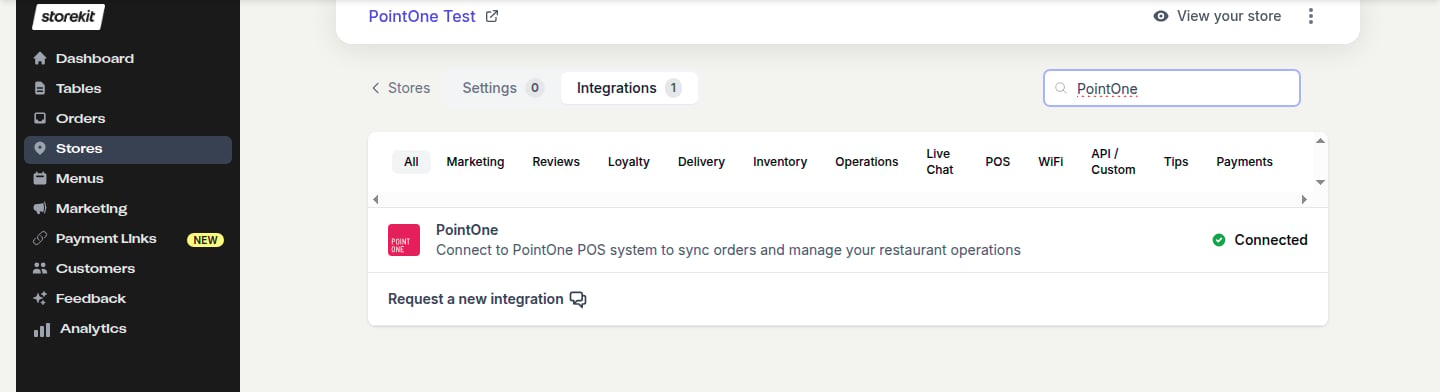 The PointOne integration is only available to accounts that have it enabled. If you don't see **PointOne** in your **Integrations** list, [contact storekit support](/docs/getting-started/contact-support) to have it turned on.
## How Orders Flow to PointOne
```
Customer places order on storekit
↓
storekit queues the order for dispatch straight away
↓
storekit builds the PointOne order (items, modifiers, customer, charges, notes)
↓
Pickup → Collection | Delivery → Delivery | Table → Table order
↓
PointOne accepts → order marked Accepted, PointOne order number stored
↓
PointOne rejects or is unreachable → order marked Failed with the reason
```
Orders are sent as soon as they're placed — you don't have to accept them first. Pre-orders are sent immediately too, carrying the requested date and time so the kitchen knows when to prepare them.
## Supported Features
| Feature | Supported |
| --------------------------------------- | :-------: |
| Manual menu sync | ✓ |
| Scheduled menu sync | ✗ |
| Lightweight sync (prices only) | ✗ |
| Product images | ✓ |
| Allergens | ✓ |
| Nutrition info | ✓ |
| Modifier groups with min/max selections | ✓ |
| Nested modifiers | ✗ |
| Category availability hours | ✓ |
| Takeaway pricing | ✓ |
| Age-restricted (18+) items | ✓ |
| Stock status at time of sync | ✓ |
| Portions / sizes | ✗ |
| Feature | Supported |
| ------------------------------------ | :-------: |
| Order injection | ✓ |
| Pre-orders (requested date and time) | ✓ |
| Order buffering | ✗ |
| Manual resend from the order page | ✓ |
| Discounts and promo codes | ✓ |
| Tips | ✓ |
| Service charge | ✓ |
| Custom order notes template | ✓ |
| Delivery details | ✓ |
| Basket validation | ✗ |
| Auto-snooze sold-out items | ✗ |
| Feature | Supported |
| --------------------------------------------------- | :-------: |
| Live bill sync | ✓ |
| Apply payments to bill | ✓ |
| Partial payments and several guests paying one bill | ✓ |
| POS terminal payments shown on the bill | ✓ |
| PointOne-generated table QR codes | ✓ |
| Bill closed in storekit when settled at the POS | ✓ |
| Add storekit orders to an open PointOne bill | ✗ |
| Feature | Supported |
| --------------------------------------- | :-------: |
| Floor plan / table import from PointOne | ✗ |
| Real-time stock updates | ✗ |
| One storekit store per PointOne site | ✓ |
## Related Guides
Compare PointOne with storekit's other POS integrations
How order injection works across POS providers
General menu-sync behaviour and limits
How pay-at-table works across storekit
## Related topics
- [Connecting PointOne](/docs/guides/integrations/pos/pointone/connect.md)
- [PointOne Orders](/docs/guides/integrations/pos/pointone/orders.md)
- [PointOne Troubleshooting](/docs/guides/integrations/pos/pointone/troubleshooting.md)
- [PointOne Pay at Table](/docs/guides/integrations/pos/pointone/pay-at-table.md)
- [PointOne Menu Sync](/docs/guides/integrations/pos/pointone/menu-sync.md)
The PointOne integration is only available to accounts that have it enabled. If you don't see **PointOne** in your **Integrations** list, [contact storekit support](/docs/getting-started/contact-support) to have it turned on.
## How Orders Flow to PointOne
```
Customer places order on storekit
↓
storekit queues the order for dispatch straight away
↓
storekit builds the PointOne order (items, modifiers, customer, charges, notes)
↓
Pickup → Collection | Delivery → Delivery | Table → Table order
↓
PointOne accepts → order marked Accepted, PointOne order number stored
↓
PointOne rejects or is unreachable → order marked Failed with the reason
```
Orders are sent as soon as they're placed — you don't have to accept them first. Pre-orders are sent immediately too, carrying the requested date and time so the kitchen knows when to prepare them.
## Supported Features
| Feature | Supported |
| --------------------------------------- | :-------: |
| Manual menu sync | ✓ |
| Scheduled menu sync | ✗ |
| Lightweight sync (prices only) | ✗ |
| Product images | ✓ |
| Allergens | ✓ |
| Nutrition info | ✓ |
| Modifier groups with min/max selections | ✓ |
| Nested modifiers | ✗ |
| Category availability hours | ✓ |
| Takeaway pricing | ✓ |
| Age-restricted (18+) items | ✓ |
| Stock status at time of sync | ✓ |
| Portions / sizes | ✗ |
| Feature | Supported |
| ------------------------------------ | :-------: |
| Order injection | ✓ |
| Pre-orders (requested date and time) | ✓ |
| Order buffering | ✗ |
| Manual resend from the order page | ✓ |
| Discounts and promo codes | ✓ |
| Tips | ✓ |
| Service charge | ✓ |
| Custom order notes template | ✓ |
| Delivery details | ✓ |
| Basket validation | ✗ |
| Auto-snooze sold-out items | ✗ |
| Feature | Supported |
| --------------------------------------------------- | :-------: |
| Live bill sync | ✓ |
| Apply payments to bill | ✓ |
| Partial payments and several guests paying one bill | ✓ |
| POS terminal payments shown on the bill | ✓ |
| PointOne-generated table QR codes | ✓ |
| Bill closed in storekit when settled at the POS | ✓ |
| Add storekit orders to an open PointOne bill | ✗ |
| Feature | Supported |
| --------------------------------------- | :-------: |
| Floor plan / table import from PointOne | ✗ |
| Real-time stock updates | ✗ |
| One storekit store per PointOne site | ✓ |
## Related Guides
Compare PointOne with storekit's other POS integrations
How order injection works across POS providers
General menu-sync behaviour and limits
How pay-at-table works across storekit
## Related topics
- [Connecting PointOne](/docs/guides/integrations/pos/pointone/connect.md)
- [PointOne Orders](/docs/guides/integrations/pos/pointone/orders.md)
- [PointOne Troubleshooting](/docs/guides/integrations/pos/pointone/troubleshooting.md)
- [PointOne Pay at Table](/docs/guides/integrations/pos/pointone/pay-at-table.md)
- [PointOne Menu Sync](/docs/guides/integrations/pos/pointone/menu-sync.md)