> ## Documentation Index
> Fetch the complete documentation index at: https://storekit.com/docs/llms.txt
> Use this file to discover all available pages before exploring further.
# How Taxes Work
> The two ways storekit can price tax, where your store's tax settings live, and what customers see at checkout.
Every store has a **Taxes** page. It sets whether your menu prices include tax, which taxes you charge, and what each one applies to. storekit calculates tax on every order from these settings.
## Find Your Tax Settings
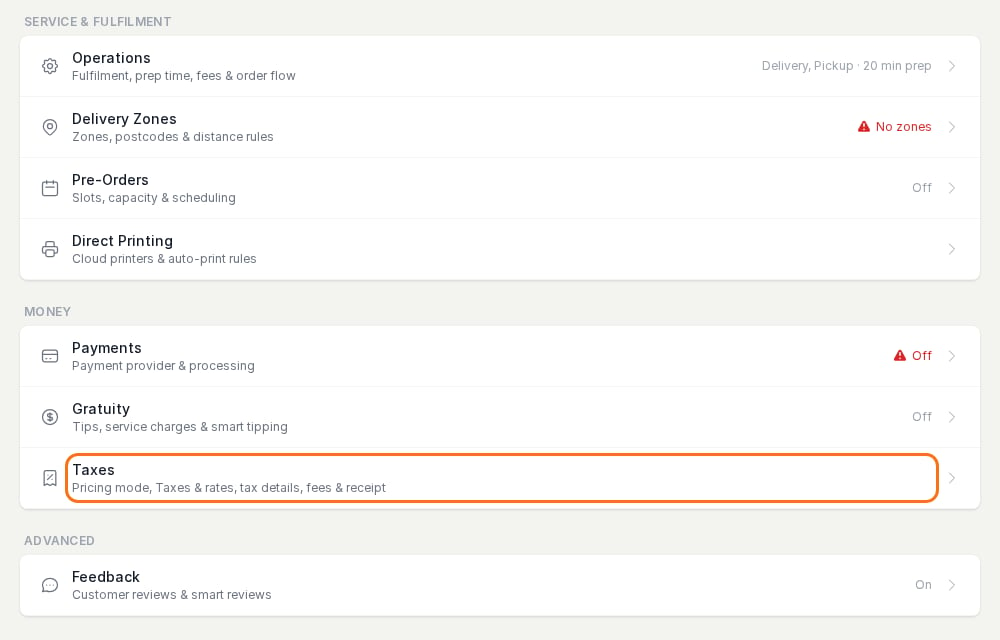
Go to **Stores** → your store → **Settings** → **Taxes**. It's in the **Money** group, under **Payments** and **Gratuity**.
 ## Two Ways to Price Tax
The **Prices** setting at the top of the page decides which one your store uses.
| **Prices** setting | What the menu shows | What the customer pays | Typical for |
| - | - | - | - |
| **Menu prices include tax** | The price with tax already in it | The menu price. The tax is the part of it storekit records on the order. | UK, EU, Australia and most countries with VAT or GST |
| **Tax is added at checkout** | The price before tax | The menu price plus tax, shown as its own line at checkout | United States (sales tax) |
These are the only two options.
## What's on the Taxes Page
| Section | What it does |
| - | - |
| **Prices** | Whether menu prices include tax or tax is added at checkout. |
| **Taxes** | Each tax has a **Name** and one or more rates. Enter each rate per service (for example **Pickup** and **Delivery**). Only the services your store offers get a column. Leave a service blank where the rate isn't charged. **Customer pays** shows the total rate for each service. |
| **Applied to** | Which tax applies to **Items without their own tax**, the **Delivery fee**, the **Service charge** and the **Tip**. Each can be **Not taxed**. |
| **VAT number** / **Sales tax permit number** / **Tax number** | Your tax registration, printed on receipts and invoices with the store address. The label depends on your store's country. |
Nothing changes until you click **Save** at the bottom of the page.
## Give One Item a Different Tax
Items use the tax set in **Items without their own tax**. To charge a different tax on one item, such as a lower rate on bakery goods sold to take home:
1. Add that tax on the **Taxes** page and click **Save**.
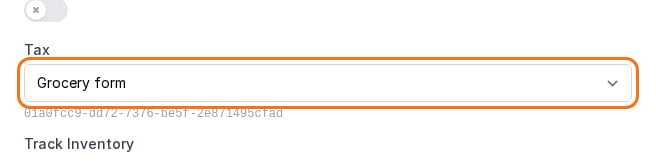
2. Open the menu, click the item, and choose the tax in its **Tax** field.
## Two Ways to Price Tax
The **Prices** setting at the top of the page decides which one your store uses.
| **Prices** setting | What the menu shows | What the customer pays | Typical for |
| - | - | - | - |
| **Menu prices include tax** | The price with tax already in it | The menu price. The tax is the part of it storekit records on the order. | UK, EU, Australia and most countries with VAT or GST |
| **Tax is added at checkout** | The price before tax | The menu price plus tax, shown as its own line at checkout | United States (sales tax) |
These are the only two options.
## What's on the Taxes Page
| Section | What it does |
| - | - |
| **Prices** | Whether menu prices include tax or tax is added at checkout. |
| **Taxes** | Each tax has a **Name** and one or more rates. Enter each rate per service (for example **Pickup** and **Delivery**). Only the services your store offers get a column. Leave a service blank where the rate isn't charged. **Customer pays** shows the total rate for each service. |
| **Applied to** | Which tax applies to **Items without their own tax**, the **Delivery fee**, the **Service charge** and the **Tip**. Each can be **Not taxed**. |
| **VAT number** / **Sales tax permit number** / **Tax number** | Your tax registration, printed on receipts and invoices with the store address. The label depends on your store's country. |
Nothing changes until you click **Save** at the bottom of the page.
## Give One Item a Different Tax
Items use the tax set in **Items without their own tax**. To charge a different tax on one item, such as a lower rate on bakery goods sold to take home:
1. Add that tax on the **Taxes** page and click **Save**.
2. Open the menu, click the item, and choose the tax in its **Tax** field.
 Modifiers use **Same as the item** unless you pick a tax for them.
## Next Steps
What a store is set up with when you create it, and what to check.
Add tax at checkout, as US sales tax works.
How taxes work when your store is connected to a point of sale.
storekit calculates tax from the settings you enter, but it doesn't give tax advice. Check your rates and registration with your accountant or your local tax authority.
## Related topics
- [Taxes and Your POS](/docs/guides/taxes/pos.md)
- [Lightspeed Pay at Table](/docs/guides/integrations/pos/lightspeed/pay-at-table.md)
- [PointOne Pay at Table](/docs/guides/integrations/pos/pointone/pay-at-table.md)
- [How Company Matching Works](/docs/catering/marketing/company-matching.md)
- [Sales and accounting reports in storekit](/docs/guides/reports/overview.md)
This documentation is built and hosted on [Mintlify](https://mintlify.com), a developer documentation platform.
Modifiers use **Same as the item** unless you pick a tax for them.
## Next Steps
What a store is set up with when you create it, and what to check.
Add tax at checkout, as US sales tax works.
How taxes work when your store is connected to a point of sale.
storekit calculates tax from the settings you enter, but it doesn't give tax advice. Check your rates and registration with your accountant or your local tax authority.
## Related topics
- [Taxes and Your POS](/docs/guides/taxes/pos.md)
- [Lightspeed Pay at Table](/docs/guides/integrations/pos/lightspeed/pay-at-table.md)
- [PointOne Pay at Table](/docs/guides/integrations/pos/pointone/pay-at-table.md)
- [How Company Matching Works](/docs/catering/marketing/company-matching.md)
- [Sales and accounting reports in storekit](/docs/guides/reports/overview.md)
This documentation is built and hosted on [Mintlify](https://mintlify.com), a developer documentation platform.