
Print and Check the Orders
1
Choose the day's orders
Go to Orders → Catering, choose your stores, and find the date you are packing for.
2
Open the pack lists
Click Pack lists beside that date. The printable page contains one card per order for the selected day and stores.
3
Print the cards
Click Print. Choose your printer, or save a PDF from your browser’s print dialogue if available.
4
Check each order before handover
Match the order code to the food. Check quantities and modifiers, then read the item allergens and the order’s Allergens:, May contain: and Notes: information where present.Check Drop details or Pickup details, the time and the Contact details before the order leaves. Keep customer contact information with the team handling that order.
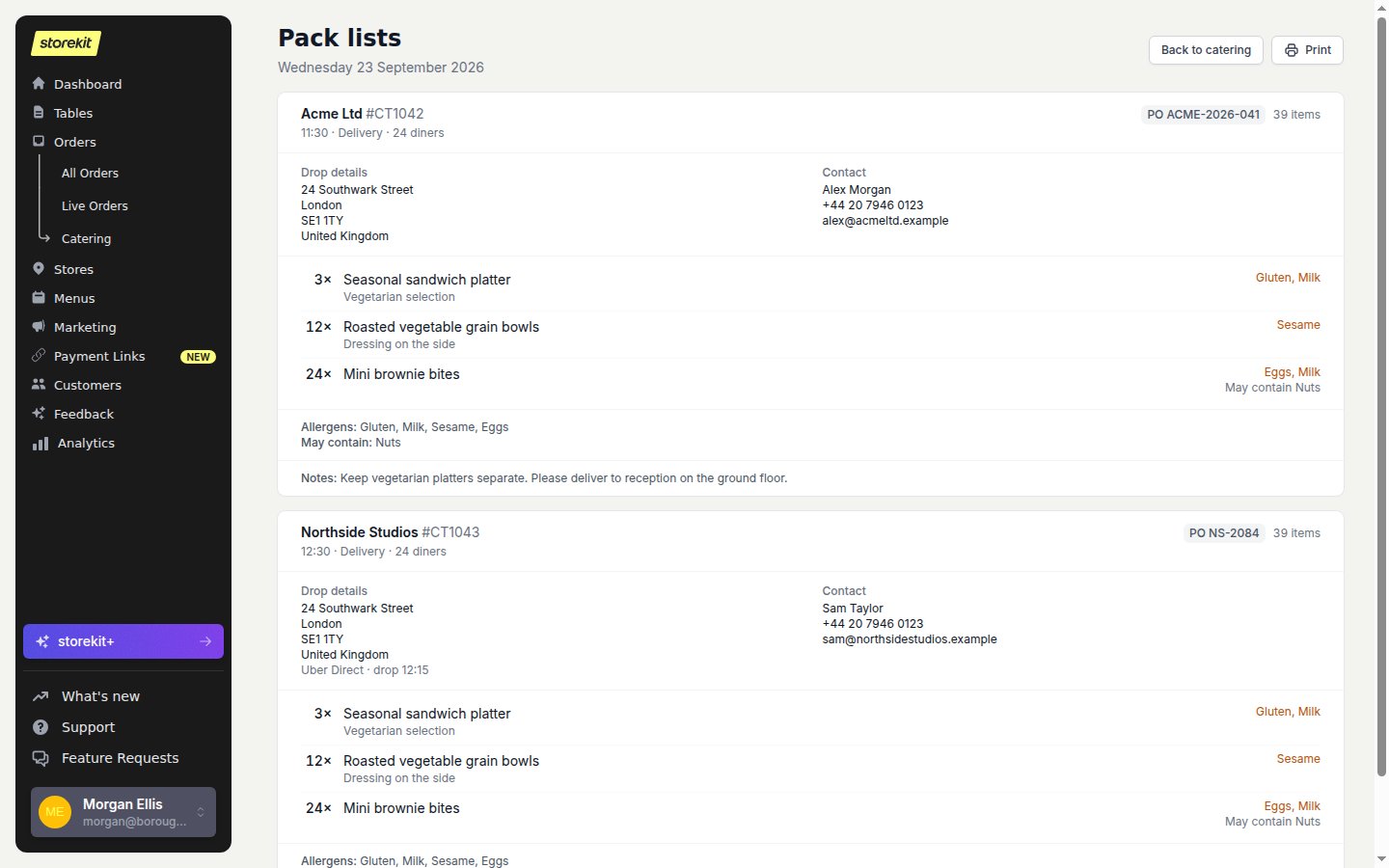
Each pack-list card keeps the food, contact and handover details together. Example data.
Pack lists show information recorded on the order and its items. Check dietary requests against your ingredients and kitchen procedures; a printed list does not verify that a meal is safe for a particular allergy.
Next
- Print Item Labels to identify individual meals. Labels do not replace the pack list.
- Catering Views and Printouts lists the fields shown on each card.